

Tensorlake Account
You need to have a Tensorlake Cloud account to make API requests if you’re using the Python SDK, the@tensorlakeai/tensorlake npm package, a generated TypeScript client, or directly
calling the REST API. You can create an account on cloud.tensorlake.ai.
API keys
API keys are project-specific credentials that allow programmatic access to resources within a project. Each API key exists solely within the context of its project and has the same permissions as a project member.API keys cannot have organization-level permissions.
Creating API keys
- Go to the Tensorlake Dashboard
- Select the project to make API calls against.
- Create an API key.
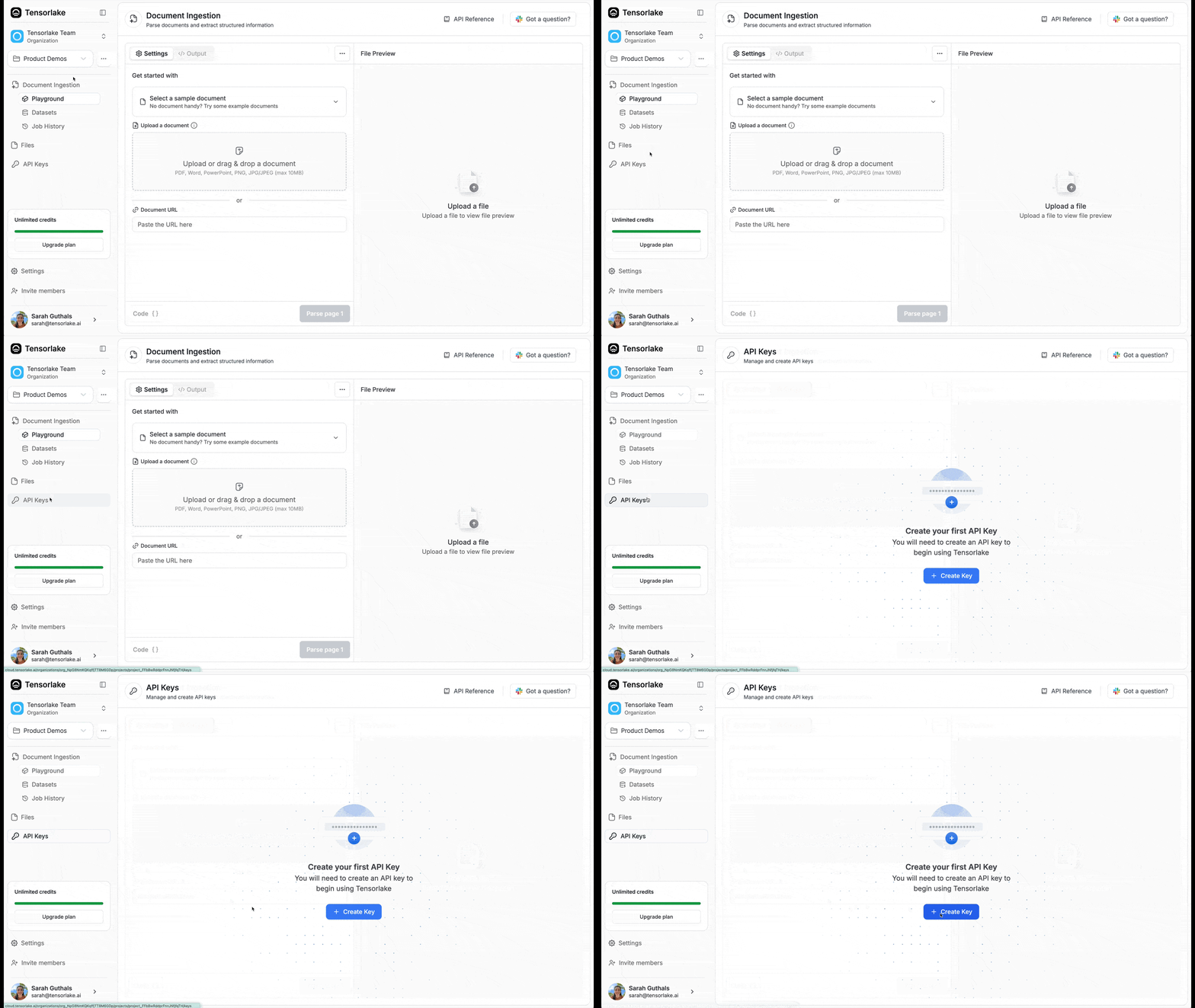
Every tensorlake API key starts with
tl_apiKey_*.SDK and CLI authentication
Tensorlake’s user-facing clients use these credentials differently:- Python and TypeScript SDKs: use a project-scoped API key, passed directly
to the client or through
TENSORLAKE_API_KEY. The API key selects its project; do not configure separate organization or project IDs. - REST API calls: send the same API key as an
Authorization: Bearertoken. tlCLI: useTENSORLAKE_API_KEY, or runtl loginto obtain a Personal Access Token (PAT) and select an organization and project interactively.
- Your own machine: run
tl login. Each login is saved as a context, and you switch between projects without logging in again. See Switch Between Projects in the CLI. - CI, a container, or a server without a browser: set
TENSORLAKE_API_KEYto a project API key. The key selects the project, so the CLI needs nothing else. SDK code in the same job uses the same key.
tl login authenticates the CLI only. It does not provide credentials to Python or TypeScript SDK code; set TENSORLAKE_API_KEY for SDK processes. An API key in the environment also overrides the CLI’s current context. If tl whoami names a project you did not pick, check your shell profile for TENSORLAKE_API_KEY.
Browser applications connecting directly to an authenticated sandbox port are
a separate case. The sandbox proxy accepts the signed-in Tensorlake Cloud
session cookie together with the organization and project selected by the
browser application. See Browser session authentication.
Tensorlake Python SDK
The Tensorlake SDK leverages API keys for authentication. For example:your_app.py
TypeScript
For sandbox and cloud/application APIs, use the official@tensorlakeai/tensorlake npm package.
fetch is available globally.
The npm package covers sandboxes plus cloud/application APIs. See Sandboxes to get started.
REST API
REST API requests need to include the API key in the header as a Bearer token. For example, to make a request to the Sandboxes API, you would use the following curl command:Frequently Asked Questions
What if I forgot my API key or need to regenerate it?
What if I forgot my API key or need to regenerate it?
You can regenerate your API key from the Tensorlake Dashboard. Go to your project settings, find the API keys section, and create a new key. Remember to update your applications with the new key.
Can I use the same API key across multiple projects?
Can I use the same API key across multiple projects?
No, API keys are project-specific. Each API key only works within the context
of the project where it was created. You’ll need separate API keys for each
project.
What permissions do API keys have by default?
What permissions do API keys have by default?
API keys have the same permissions as a project member. They cannot have
organization-level permissions and are limited to project-specific operations.
How do I rotate my API keys for security?
How do I rotate my API keys for security?
Create a new API key first, update your applications to use the new key, then
delete the old key from the dashboard. This ensures no downtime during
rotation.
What should I do if my API key is compromised?
What should I do if my API key is compromised?
Immediately delete the compromised API key from the Tensorlake Dashboard and
generate a new one. Update all applications using the old key as soon as
possible.
Can I set expiration dates for API keys?
Can I set expiration dates for API keys?
API keys do not have explicit expiration dates. Each API key will remain
active until it is deleted.
How do I securely store API keys in my application?
How do I securely store API keys in my application?
Use environment variables or secure credential management systems. Never
hardcode API keys in your source code or commit them to version control.
What's the difference between API keys and user authentication?
What's the difference between API keys and user authentication?
API keys are for programmatic access and machine-to-machine communication,
while user authentication is for interactive dashboard access. API keys don’t
expire with user sessions.
Can I limit which endpoints an API key can access?
Can I limit which endpoints an API key can access?
API keys inherit project member permissions.